Looking for a certificate or doing the inspection yourself? Keep tenancy details, certificate dates and inspection records with the right property, together on your iPhone. Built for UK landlords managing 1–10 properties themselves.
Work through tenancy, certificate, inspection, repair and backup records in your browser. No address, tenant name or email required, and nothing is saved.
Seven practical checks for your visit: room notes, photos, readings and follow-up. A one-page PDF you can print or keep on your phone. Free, with no email sign-up.
Doing the inspection yourself? Looking for a certificate?
See how the app helps with the everyday details of looking after your rentals. These short, silent demos use fictional records and are edited for length.
From meter readings to an inspection report
Keep readings with your inspection, preview its PDF and collect a signature in the app.
Read the demonstration
A fictional inspection is open. An electricity reading of 1234 kWh is entered. The inspection PDF is previewed and scrolled. The tenant signature screen is opened and a demonstration signature is drawn. The closing card links to landlordcompanion.app.
Edit a compliance record, save its dates and return to the property’s status overview.
Read the demonstration
An EICR record is edited for a fictional property. The issue and expiry dates are entered and saved. The final overview shows saved records and their date-based statuses. This clip demonstrates dates, not importing a certificate. Recorded statuses are an organisational aid, not a guarantee of legal compliance.
When you are the person arranging repairs, checking agreements and doing the inspections, it helps to have the records in one place. Find what you need without piecing it together from separate folders.
01
Your properties, at a glance
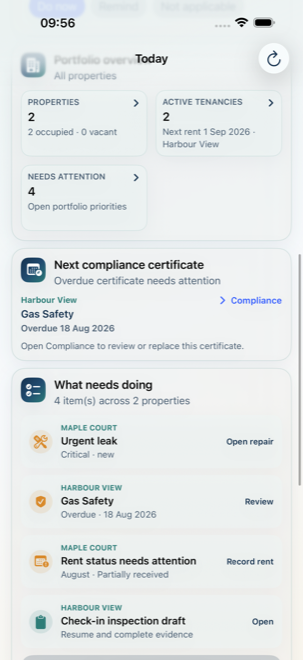
Today brings properties, active tenancies, upcoming rent, certificate dates and work needing attention together. Find the next record to review without searching through separate folders.
02
Properties, people & tenancies
Keep property details, tenant contacts and agreements linked. Manage occupied and vacant properties, end a tenancy and retain its history when a replacement tenancy begins.
03
Agreements & document inbox
Import agreements and certificates through Files or capture documents. On-device text recognition assists review; check extracted details yourself before saving them to a property or tenancy.
04
Certificates & reminders
Record Gas Safety, EICR, EPC and other compliance evidence. Review dates, replace certificates and use local reminders to keep important work visible.
05
Check-in, interim & check-out
Create and resume inspections. Record room conditions, meter readings, keys, notes, photographs and signatures alongside the relevant property and tenancy.
06
Repairs & follow-up
Turn inspection findings into linked repairs, keep follow-up notes and track tasks alongside the evidence that prompted them.
07
Rent records
Keep tenancy rent information and record rent status so outstanding administration remains visible. This is record-keeping, not a payment collection or banking service.
08
PDF reports & reviewed sharing
Generate inspection PDFs and prepare redacted sharing copies. Review the exact file and recipient before opening the iOS share sheet; photographs and addresses may still identify people.
09
Backup, restore & local controls
Export and restore workspace backups through Files. Choose encrypted backup for password protection; integrity checks help detect damaged archives. Use local deletion and workspace-reset controls when appropriate.
10
App lock & offline use
Use supported Face ID, Touch ID or device authentication for app lock. Core workflows run on your iPhone without a Landlord Companion account, tenant portal or developer-hosted sync service.
Private by design. Shared by choice.
A photograph is more than a file.
Inspection photos, signatures and documents can contain someone’s personal information. Keep collection purposeful, protect the device and review every export.
 Landlord Companion